

Cox Internet Coverage Map: Where Cox Is Available and How to Check Your Address
If you are looking for a Cox internet coverage map, you want a clear answer: Can I get Cox internet at my home?
The simple answer is this. Cox has a wide service area in the United States, but availability depends on your exact address, not just your city or state. Some people see their city on a map, but still cannot get service at their house.
This guide will help you understand where Cox Fiber Internet service is available, how coverage works, and how to check your address the right way.
What a Cox Internet Coverage Map Really Means
A coverage map shows the overall service area of Cox. It tells you which states and cities are inside the network. But it does not confirm service for every street or building. Internet coverage works in small sections. Even inside the same city:
- One street may have Cox service
- Another nearby street may not
- One home may get high-speed plans
- Another may only get basic service
So, think of a coverage map as a starting point, not a final answer.
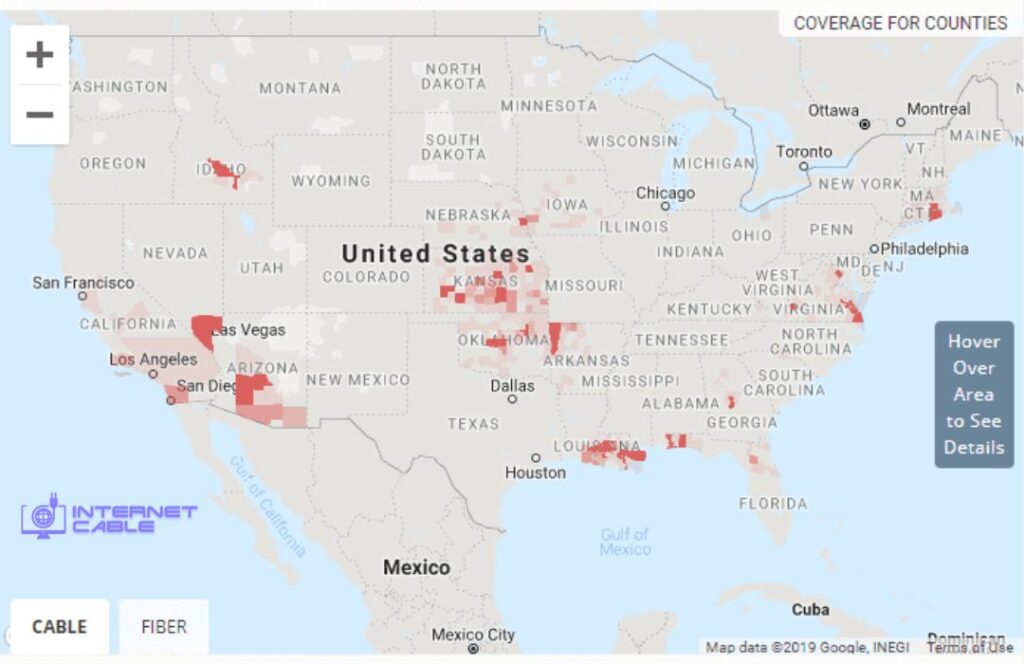
Where Cox Internet Is Available
Cox provides internet service across many parts of the U.S. Based on official service listings, Cox operates in states such as:
- Arizona
- California
- Virginia
- Louisiana
- Oklahoma
- Kansas
- Nevada
- Rhode Island
- Connecticut
- Florida
- Georgia
- Ohio
- Arkansas
- Iowa
- Idaho
- Missouri
- Nebraska
- North Carolina
- Massachusetts.
Within these states, Cox is stronger in certain cities. Large cities like Phoenix, Las Vegas, and Oklahoma City often have wider coverage and better speed options. But even in these cities, not every address is guaranteed service.
Why Your City May Be Covered, but Your Home Is Not
This is one of the most common issues users face. A city can be listed in the Cox coverage map, but your home may still not qualify. This happens because internet service depends on local network lines.
Some reasons include:
- Your street is not connected to Cox lines
- Your building does not support Cox service
- The area is still expanding or limited
- Only part of the neighbourhood is covered
That is why checking by city is not enough. You must check by full address.
Cox Cable vs Fiber Coverage
Many users also want to know what type of internet Cox offers in their area. Cox mainly provides cable internet, but in some areas, it also offers faster speeds and upgraded networks. This means:
- One home may get standard cable speeds
- Another may get higher speed tiers
- Some areas may support gig-level plans
Cox fiber internet plans often include speeds like 300 Mbps, 500 Mbps, 1 Gig, and even higher in select areas. But these plans are not available everywhere. So, coverage is not just about availability. It is also about what type of service your address supports.
How to Check Cox Internet Availability (The Right Way)
The most accurate way to check Cox service is simple. Use your exact home address. This will show:
- If Cox is available
- What plans can you get
- What speeds are offered
- What pricing applies
You can also use tools like broadband maps for a second check, but the final result always depends on the provider’s system for your address.
Do Not Confuse Coverage Types
Many users get confused because Cox uses the word “coverage” in different ways. There are three main types:
1. Home Internet Coverage
This is what you are looking for. It shows if Cox can connect internet to your home.
2. In-Home WiFi Coverage
This is about signal strength inside your house. It depends on routers and setup, not availability.
3. Cox Hotspot Coverage
These are public WiFi spots across cities. They are useful for travel, but they do not mean Cox is available at your home.
Always focus on home internet availability when checking coverage.
What If Cox Is Not Available in Your Area?
If Cox is not available at your address, you still have options. You can check other providers in your area. Many places have:
- Fiber providers
- Cable alternatives
- Fixed wireless services
The best step is to compare providers by ZIP code or address. This helps you find the fastest and most reliable option where you live.
Affordable Cox Internet Options
If Cox is available at your address, you may also find lower-cost plans. Cox offers options for users who want basic internet at a lower price. These plans depend on eligibility and location.
So, when you check availability, also look at:
- Available plans
- Monthly pricing
- Included features
This helps you choose the right option, not just any option.
Summary:
A Cox internet coverage map is useful, but it is not enough on its own.
It shows where Cox operates, but it does not confirm service for your home. The only way to know for sure is to check your exact address.
If your area is covered, you can then compare plans and speeds. If not, you can quickly move to other providers in your area.


